
Compatible with Claude Code and Claude Cowork — a pre-assembled desk pet for your terminal.
Bluetooth desk companion that surfaces tool permission prompts, recent messages, and an animated pet. Approve or deny with a physical button. Compatible with Claude Code and Claude Cowork. Runs the open-source claude-desktop-buddy firmware published by Anthropic, flashed and ready out of the box.
🎁 Lifetime firmware updates · full refund any time before ship
An independent product. Not made, sold, or endorsed by Anthropic PBC. "Claude" is a trademark of Anthropic PBC.
What is Vibe Desktop Buddy?
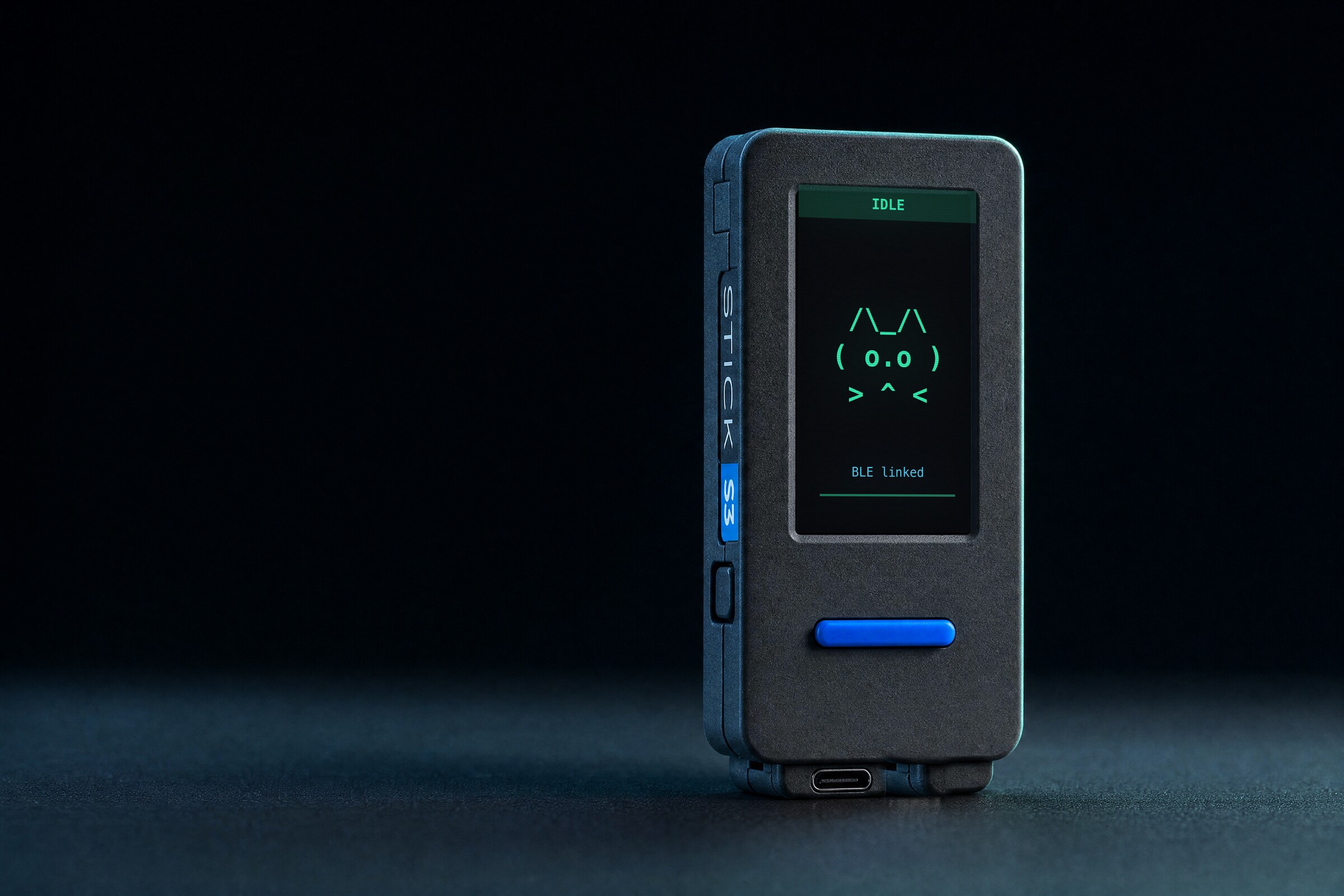
Vibe Desktop Buddy is an opt-in hardware companion compatible with Claude Code and Claude Cowork. The Claude desktop app for macOS and Windows can talk to Bluetooth maker devices, and Vibe Desktop Buddy is a ready-to-run desk pet that uses that channel: it wakes when you start a session, quietly idles while tools run, gets visibly impatient when a permission prompt is waiting, and lets you approve or deny right from the device without touching your keyboard.
Open BLE protocol
Vibe Desktop Buddy speaks the open Nordic UART Service wire protocol published by Anthropic, so every unit stays compatible with future releases.
ESP32-S3 + M5StickS3
The firmware runs on the M5StickS3, a pocket-sized ESP32-S3 board with a 1.14" 135×240 colour display, three buttons, a 6-axis IMU, speaker, microphone, IR, and a LiPo battery.
Ready-to-run hardware
Every unit arrives assembled, flashed, and QA-checked before it reaches your desk — no soldering, no PlatformIO, no pain.
Tap to approve
Press A to approve, B to deny. Hold A for the settings menu. The screen lights up instantly when a permission prompt lands.
Why developers want a desk pet
Coding sessions can run for hours. Vibe Desktop Buddy keeps that long-running assistant ambient, physical, and trustworthy — the way terminals got an LED next to them in the 80s.
Features of Vibe Desktop Buddy
Everything the reference firmware ships with — pre-flashed, pre-paired, ready the moment you unbox it.
BLE auto-reconnect
Vibe Desktop Buddy pairs once with the Claude desktop app and reconnects automatically whenever both sides are awake. No daily re-pairing.
Approve or deny on device
Button A approves a pending permission prompt, button B denies it. Screen stays on while a prompt is pending so nothing slips by.
Transcript scrollback
Scroll the recent messages from your session right on the device display. No need to alt-tab mid-flow to see what was just said.
18 ASCII pets, 7 states each
Sleep, idle, busy, attention, celebrate, dizzy, heart — a full vocabulary of emotions for your desk pet. Choice persists across power-offs.
Custom GIF characters
Drag a 96-pixel-wide GIF character pack (manifest.json + PNGs) onto the Hardware Buddy window, and the device switches to GIF mode live.
Nap mode, long battery life
Face the device down and it naps while its battery refills. The screen auto-powers off after 30s to stretch runtime between charges.
IMU-aware reactions
Shake the device to dizzy it, face-down to nap, shake hard to wake. The built-in IMU turns physical gestures into firmware states.
Open firmware, open protocol
Every unit we ship runs the upstream open-source firmware from <a href='https://github.com/anthropics/claude-desktop-buddy' class='text-primary underline' target='_blank' rel='noopener'>anthropics/claude-desktop-buddy</a>. Flash your own, fork it, or build a custom board.
How to set up your Vibe Buddy
Four steps from box to your first permission approved on the device:
1. Unbox and power on
Press the power button. It ships pre-flashed with the latest firmware and pre-charged for roughly two hours of active use.
2. Enable Developer Mode
In the Claude desktop app, open Help → Troubleshooting → Enable Developer Mode, then Developer → Open Hardware Buddy… and click Connect to find your device.
3. Pair and go
Grant Bluetooth permission when macOS or Windows asks. The device auto-reconnects after that — start a session and watch it wake up.
4. Make it yours
Hold button A to open the menu, cycle through the 18 ASCII pets, or drop a GIF character pack onto the Hardware Buddy window to give your device a custom face.
Get early access to Vibe Desktop Buddy
We are preparing the first batch now. Drop your email and we will ping you the moment pre-orders open — no spam, unsubscribe anytime.
Vibe Desktop Buddy FAQ
Everything people ask us about the hardware, the firmware, and the pairing flow.
No. Vibe Desktop Buddy is designed, assembled, and sold by an independent maker. We are not affiliated with, endorsed by, or sponsored by Anthropic PBC. The firmware and BLE protocol are open source, published by Anthropic at github.com/anthropics/claude-desktop-buddy; we assemble the hardware, flash it, and ship it. If you have any question about an order placed here, contact us at hello@claude-desktop-buddy.com — Anthropic cannot help with orders from this site.
A Bluetooth-connected desk pet compatible with Claude Code and Claude Cowork. It pairs with the Claude desktop app over Bluetooth, surfaces tool-permission prompts on a tiny screen, and lets you approve or deny them with physical buttons. Under the hood it runs the open-source firmware from the anthropics/claude-desktop-buddy repository on an ESP32-S3 M5StickS3.
No. Vibe Desktop Buddy ships fully assembled, flashed with the latest firmware, and charged. Unbox it, enable Developer Mode in the Claude desktop app, and pair. If you prefer to build your own, the firmware and wire protocol are fully open on GitHub.
The device works with the Claude desktop app on macOS and Windows, including Claude Code and Claude Cowork sessions. The BLE pairing dialog is reached via Help → Troubleshooting → Enable Developer Mode, then Developer → Open Hardware Buddy…
Three main things: live tool-permission prompts, scrollable recent messages from your session, and an animated ASCII pet (or custom GIF character) that reflects whether your session is idle, busy, celebrating, or waiting on you. Shaking the device makes it dizzy; placing it face-down puts it to nap.
Yes. A character pack is a folder with a manifest.json plus 96-pixel-wide GIFs for each state (sleep, idle, busy, attention, celebrate, dizzy, heart). Drop the folder onto the Hardware Buddy window and the device streams it over BLE and switches to GIF mode live. Total pack size must stay under 1.8 MB.
A single charge lasts roughly two hours of an active session with the screen on. The device auto-powers off the display after 30 seconds of inactivity and naps when placed face-down, so typical desk use stretches well beyond a workday.
The first production run is under way. Join the waitlist above and we will email you the moment pre-orders open, with pricing and a shipping estimate for your country.
Not ourselves, but if you also live in Codex or Cursor, a companion tool we recommend is this Codex Micro alternative macro pad — a 13-key desk controller with RGB agent status lights that mirror your coding agent's live state.
Put one on your desk.
$110 + $15 worldwide shipping. Founders Edition units include a founder code card, a Founders member code, email support, lifetime firmware updates, and ship summer 2026. Full refund any time before your unit ships.